Workers gather in a parking lot before dawn, hard hats in hand, waiting for the morning’s safety briefing. The supervisor pulls out a crumpled piece of paper with a few handwritten notes. Five minutes later, everyone scatters—most didn’t hear a word. This scene plays out daily on worksites where toolbox talks are treated as a box-ticking exercise instead of a life-saving ritual.
A well-structured toolbox talk PDF changes that. It turns vague reminders into clear, actionable safety discussions. More importantly, it creates accountability, ensures consistency, and provides documented proof of training—critical in audits or incident investigations.
Let’s break down how to use toolbox talk PDFs effectively, where to find reliable templates, and how to adapt them to real-world conditions.
Why Toolbox Talks Matter (And Why
Most Fail)
Toolbox talks are short, focused safety meetings usually held at the start of a shift. They address specific hazards, reinforce protocols, and encourage team dialogue. When done right, they reduce accidents and near misses. But research shows up to 60% of such meetings have no measurable impact—because they’re repetitive, poorly prepared, or ignored.
The root problem? Lack of structure.
Without a clear format, toolbox talks drift into monotony. Workers tune out. Supervisors default to “wear your PPE” every day. The moment these briefings lose relevance, they lose value.
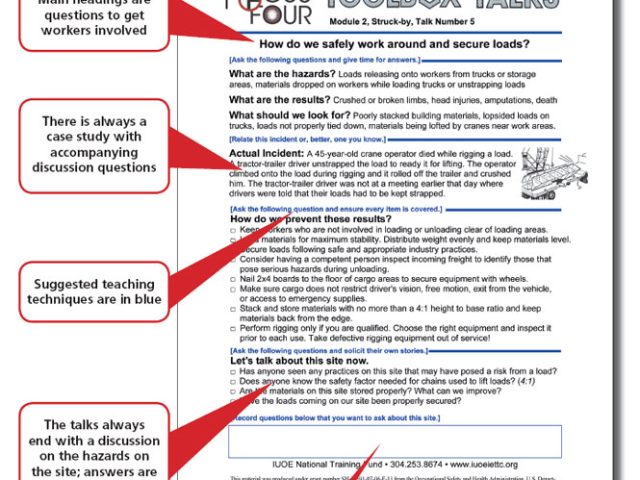
A toolbox talk PDF solves this by offering a standardized template: - Topic introduction - Real-world hazard examples - Discussion prompts - Sign-off sheet
This structure keeps talks focused, interactive, and documented.
Key Elements of an Effective Toolbox Talk PDF
Not all PDFs are created equal. A strong template includes:
#### 1. Clear Topic Header Each document should state the focus: “Working at Heights,” “Electrical Safety,” or “Slips, Trips & Falls.” Avoid vague titles like “General Safety.”
#### 2. Hazard Description Explain the risk in plain language. Instead of “Falls from elevation,” say: “Falling off ladders or scaffolds when working above 6 feet.”
#### 3. Real-World Scenarios Include specific examples relevant to the team. > Example: “Last week, a worker slipped on a wet platform during pipe installation. The area wasn’t cordoned off or marked.”
This makes the threat tangible.
#### 4. Discussion Questions Prompt engagement with open-ended questions: - “What could go wrong if we don’t secure tools on a scaffold?” - “Has anyone seen a similar hazard this week?”
These turn monologues into conversations.
#### 5. Prevention Strategies List 3–5 actionable controls: - Use tool lanyards - Install guardrails - Conduct pre-work checks

Avoid generic advice like “be careful.”
#### 6. Attendance & Verification Section Include space for names, signatures, date, and supervisor approval. This isn’t bureaucracy—it’s legal protection.
Top 5 Free Toolbox Talk PDF Resources
Many companies waste time rebuilding templates from scratch. These trusted sources offer downloadable, customizable PDFs—ready for immediate use.
| Resource | Topics Covered | Customization | Best For |
|---|---|---|---|
| OSHA.gov | 30+ core hazards | Limited (fixed format) | Compliance-first teams |
| SafetyCulture (iAuditor) | 100+ templates | High (editable PDFs & app) | Digital workflows |
| HSE UK Templates | Industry-specific risks | Moderate | International teams |
| ConstructionSafetyTips.com | Daily use, visual-heavy | High | Field crews |
| TradeSchools.edu | Entry-level topics | Moderate | Onboarding new hires |
Pro Tip: OSHA templates are great for regulatory alignment, but they’re often text-dense. Pair them with visual aids or simplify the language for better engagement.
How to Customize a Toolbox Talk PDF for Your Crew
A PDF template is a starting point—not a final product.
To make it relevant: - Localize the examples. If your crew is installing HVAC units on rooftops, focus on fall arrest systems and weather exposure—not underground mining hazards. - Use site photos. Insert images of actual work areas to illustrate risks. - Translate when needed. If your team speaks Spanish or Tagalog, provide translated versions. OSHA offers some bilingual resources. - Update frequency. Review and revise templates quarterly—or after any incident.
One electrical contractor revised their lockout/tagout PDF after a near miss. They added a photo of the exact breaker panel involved and included the worker’s quote: “I assumed it was dead. It wasn’t.” Engagement in subsequent talks increased by 70%.
Common Mistakes That Undermine Toolbox Talk PDFs
Even the best templates fail when misused. Watch for these pitfalls:
- One size fits all. Using the same “PPE” talk every Monday ignores changing site conditions.
- No follow-up. Discussing a hazard without checking if controls were implemented is wasted effort.
- Signing without attending. Some workers sign in late or not at all. Supervisors must verify presence.
- Overloading content. A 5-page PDF defeats the purpose of a 10-minute talk. Keep it to one page.
- Ignoring feedback. If workers suggest adding ladder inspection checks, update the template.
A pipeline crew in Texas reduced hand injuries by 40% after updating their “Hand Safety” PDF to include feedback about glove durability in extreme heat.
Integrating Toolbox Talk PDFs Into Daily Workflow
A PDF shouldn’t live in a folder. It needs to be part of the rhythm.
- Sample Workflow:
- Plan weekly topics (e.g., Monday: Fall Protection, Wednesday: Hazard Communication).
- Download or update the PDF the night before.
- Print copies or load them on tablets.
- Conduct the talk at the job site—near the actual hazard if possible.
- Collect signatures immediately.
- File or upload to a shared drive or safety app.
Some teams use cloud tools like Google Drive or SafetyCulture to store completed PDFs. Others print and post monthly summaries in break rooms—turning documentation into visibility.
When a PDF Isn’t Enough: Adding Digital Tools
While PDFs are reliable, digital tools can amplify impact.
Consider pairing your PDF with: - QR codes posted on equipment. Scan to pull up the relevant talk. - Voice notes from supervisors summarizing key points. - Short videos demonstrating correct vs. incorrect practices.
One mining company embedded QR codes on hard hats. Workers could scan to access the day’s talk, even if they missed the meeting.
But don’t abandon PDFs. They’re universally accessible, printer-friendly, and don’t rely on signal or software.
Build a Culture, Not Just a Checklist
The goal isn’t just to collect signatures. It’s to build a culture where safety is discussed, questioned, and owned by every team member.
A powerful toolbox talk PDF does more than inform—it invites participation. It turns passive listeners into active contributors.
When a worker says, “We should add something about ice on stairs,” and sees it in next week’s PDF, that’s engagement. That’s ownership.
Start with a solid template. Adapt it relentlessly. Treat every talk as a chance to prevent the next incident—not just to file a form.
Download a few toolbox talk PDFs today. Run one real discussion tomorrow. Track attendance. Follow up. Repeat.
Safety isn’t built in a day. But it can start with a single page.
FAQ
Where can I get free toolbox talk PDFs? OSHA, SafetyCulture, and HSE UK offer free, downloadable templates for common hazards.
How long should a toolbox talk last? Ideally 10–15 minutes. Long enough to cover risks, short enough to hold attention.
Do toolbox talks need to be documented? Yes. Signed PDFs serve as proof of training and are crucial during audits or investigations.
Can I edit toolbox talk PDFs? Most third-party templates are editable. Use tools like Adobe Acrobat or PDFescape to customize content.
How often should toolbox talks be held? Weekly is standard, but increase frequency during high-risk tasks or after incidents.
Should every worker sign the PDF? Yes. Signatures confirm attendance and understanding. Unsigned talks have limited legal value.
What topics should I cover? Focus on current tasks: working at heights, electrical safety, PPE, equipment operation, and site-specific risks.
FAQ
What should you look for in Free Toolbox Talk PDF Templates for Safer Workplaces? Focus on relevance, practical value, and how well the solution matches real user intent.
Is Free Toolbox Talk PDF Templates for Safer Workplaces suitable for beginners? That depends on the workflow, but a clear step-by-step approach usually makes it easier to start.
How do you compare options around Free Toolbox Talk PDF Templates for Safer Workplaces? Compare features, trust signals, limitations, pricing, and ease of implementation.
What mistakes should you avoid? Avoid generic choices, weak validation, and decisions based only on marketing claims.
What is the next best step? Shortlist the most relevant options, validate them quickly, and refine from real-world results.